For forty years, looking up who owned a domain name meant a WHOIS query. Since 28 January 2025, for generic top-level domains, it means an RDAP query instead. RDAP (the Registration Data Access Protocol) returns the same kind of registration data as WHOIS, but over HTTPS, in a structured JSON format, from a server found through a standardized directory rather than by guessing. This guide explains what changed, what a lookup shows today, how to perform one, what the common errors mean, and why the change both helps and complicates the investigations and recoveries we handle.
What WHOIS was
WHOIS (the public registration record for a domain name, and the protocol used to retrieve it) dates from the early 1980s. A client opens a TCP connection to port 43 on a WHOIS server, sends the domain name and a line break, and the server returns a block of plain text. There is no encryption, no authentication, and no defined format; each registry and registrar laid out its response however it liked. The protocol also has no way to refer a client from the registry (which knows the sponsoring registrar) to the registrar (which holds the full record), so a complete .com lookup meant querying Verisign first and the registrar second, by hand.
Those limitations became untenable once the EU General Data Protection Regulation required registrars to control who could see personal data, because a protocol with no authentication cannot distinguish a trademark attorney with a legitimate interest from an anonymous scraper.
What RDAP is
RDAP was standardized by the Internet Engineering Task Force to replace WHOIS for domain names, IP addresses and autonomous system numbers. An RDAP query is an ordinary HTTPS request to a registry’s or registrar’s RDAP base URL followed by /domain/example.com, and the response is a JSON document (a machine-readable text format) with defined fields for status codes, dated events such as registration and expiration, nameservers, the sponsoring registrar, and entities (the contacts). Because the structure is the same across every operator, one piece of software can read every RDAP response.
Three further features matter for investigators. RDAP supports access tiers: because it runs over HTTPS, an operator can require authentication and return more data to a user with a recognized legitimate interest than to the public. RDAP supports redirects: a registry’s server can answer a query with an HTTP redirect to the authoritative registrar’s RDAP server. And IANA maintains a bootstrap registry that maps each top-level domain to its RDAP server, so a client can find the correct server for any domain without a hand-maintained list.
WHOIS and RDAP compared
| Feature | WHOIS | RDAP |
|---|---|---|
| Transport | Plain text over TCP port 43 | HTTPS |
| Response format | Free-form text, different per operator | Standardized JSON |
| Encryption | None | TLS, as with any HTTPS request |
| Authentication and tiered access | Not supported | Supported |
| Finding the right server | Manual, by convention | IANA bootstrap registry plus redirects |
| Status for gTLDs | Registrar obligation ended 28 January 2025 | Required |
The ICANN timeline
ICANN required gTLD registries and registrars to deploy RDAP alongside WHOIS in 2019, and for several years the two ran in parallel. ICANN’s 2013 Registrar Accreditation Agreement global amendment took effect on 7 August 2023, the RDAP ramp-up period ended on 3 February 2024, and the amendment set 28 January 2025, eighteen months after its effective date, as the WHOIS Services Sunset Date on which registrar obligations to provide registration data over port 43 and web-based WHOIS ended, as recorded in ICANN’s reminder on the effective date of the 2013 RAA global amendment. Some registrars still run WHOIS voluntarily, and many country-code registries, which are not bound by ICANN contracts, still operate it, but for gTLDs RDAP is the only service a registrar must provide. We covered the consequences in our post on the WHOIS sunset and how to look up who owns a domain.
The rollout was uneven. In its Contractual Compliance monthly report for May 2024, ICANN noted that 20 registrars had not yet uploaded their RDAP base URLs to the Naming Services portal, and that it had opened two new inquiries about access to nonpublic registration data that month. A registrar whose base URL is missing cannot be reached by redirect.
What a lookup shows today, and what is redacted
A public RDAP lookup for a .com domain today returns the domain name, the sponsoring registrar and its abuse contact, the registration, last-updated and expiration dates, the EPP status codes (registry flags such as clientTransferProhibited that control whether the domain can be transferred, updated or deleted), the nameservers, and whether DNSSEC is enabled. For the contacts, it usually returns the registrant’s organization if the registrar publishes it, the state or province and country, and a note that the remaining fields are redacted, with a link or form through which the registrant can be contacted. If the domain uses a privacy or proxy service, the entity returned is the service, not the registrant.
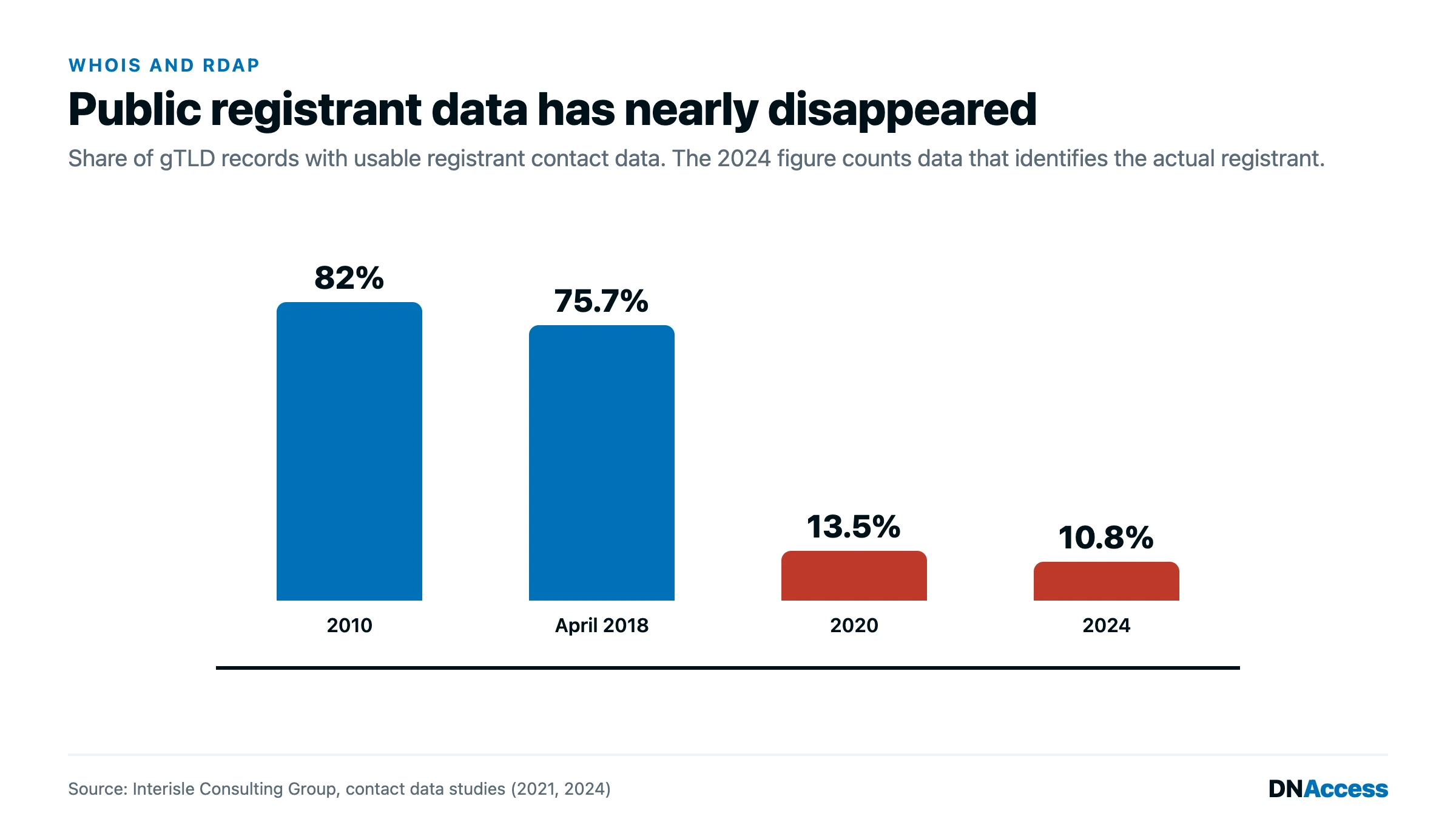
That is a thin record. Interisle Consulting Group’s gTLD Registration Contact Data Study of June 2024, examining 3,000 gTLD domains, found that 31.0% had redacted contact data, 58.2% were proxy-protected, and only 10.8% had identifying contact data for the actual registrant. RDAP did not cause that; GDPR and ICANN’s 2018 Temporary Specification did. But RDAP is the protocol through which redaction is now delivered.
How to perform an RDAP lookup
The simplest route is ICANN’s own lookup tool at lookup.icann.org. Enter the domain and the tool queries the registry’s RDAP server, follows the redirect to the registrar’s server, and presents both responses in readable form, with the raw JSON available. It is the lookup we recommend for a quick, authoritative answer.
For a direct query, start with the IANA bootstrap file, which lists the RDAP base URL for every top-level domain that has one. Append /domain/ and the domain name to the base URL, request it over HTTPS, and read the JSON. For .com, the registry’s response identifies the sponsoring registrar and links to the registrar’s own RDAP record, which holds the fuller data; follow it. The community service at rdap.org performs this bootstrapping for you: a request to rdap.org for a domain is redirected to the correct authoritative server, which is convenient for scripts and for TLDs whose server you do not know.
Each country-code registry decides whether to offer RDAP, WHOIS, both or neither, and for a ccTLD without RDAP the registry’s WHOIS server or web lookup remains the route.
Common errors and what they mean
“No registry RDAP server was identified for this domain” means the bootstrap lookup found no RDAP server for the domain’s top-level domain. For a ccTLD, it usually means the registry does not offer RDAP. For a gTLD, it can mean the domain is misspelled or the TLD is not delegated. It does not mean the domain is unregistered; an unregistered domain in a TLD with RDAP returns a specific not-found response.
“The RDAP server redacted the value” or a field marked “REDACTED FOR PRIVACY” means the server returned the record but withheld that field under its privacy policy. The domain is registered and the registrar, dates and nameservers are present; only the identifying contact data has been removed. This is the expected result for most domains. The remedy, where a legitimate interest exists, is a disclosure request to the registrar through ICANN’s Registration Data Request Service or a subpoena, and for historical ownership, the archives described in our guide to WHOIS history.
Performance and concentration
RDAP’s advantages come with operational costs. In a February and March 2021 study, Carlos Gañán of ICANN, presenting at IFIP TMA 2021, found 4,136 registrars offering RDAP services through only 242 unique base URLs, plus 287 RDAP services operated by TLD registries, and across 10,598,236 valid responses the median RDAP response time was 0.97 seconds against 0.28 seconds for WHOIS, so that WHOIS was on median three times faster. The measurement predates the sunset, but two findings remain relevant. RDAP endpoints are concentrated, because most registrars outsource the service to a back-end provider, so an outage at one provider silences many registrars at once. And RDAP is slower per query, which matters for monitoring systems that poll thousands of domains and for scripted bulk lookups.
Why RDAP helps and hurts investigations
RDAP helps in three ways. Standardized output means an investigation tool can query every gTLD registrar with the same code, which makes it practical to monitor many domains and detect changes in registrar, status codes and nameservers automatically. Redirects mean the authoritative record is found without guesswork. And tiered access creates a protocol-level path for a qualified requester to receive data the public cannot see, if and when registrars and ICANN policy make that path real.
RDAP hurts in the sense that it is the protocol through which the redacted era is delivered. For a stolen domain recovery, a current RDAP record confirms that the registrar changed and when, and gives the gaining registrar’s abuse contact, but it does not name the thief, and the registrant organization field is frequently blank or set to a privacy service. The investigation therefore depends on historical archives captured before redaction, on DNS history, and on registrar disclosure, which is the work described in our domain name background check service and in the companion guides on WHOIS history and domain history red flags. For the basics of what the registration fields mean, our post on domain name registration data and WHOIS is the place to start.
What DNAccess does
DNAccess uses RDAP as the first step of every domain investigation, to establish the current registrar, status codes, dates and nameservers, and then goes to the historical archives, DNS history and registrar records that RDAP cannot provide. That combination is the core of our domain name background check for buyers and attorneys, and of our stolen domain name recovery work, where the RDAP record identifies who must be contacted and the archives prove who the rightful owner is. If a lookup has returned a redacted record and you need to know who is behind a domain, contact us.