A domain name is the human-readable address, such as dnaccess.com, that people type into a browser or put after the @ in an email address, and that the internet’s directory system translates into the numeric address of the server behind it. When you register one, you do not buy it outright. You acquire a renewable right to use that exact name for a fixed term, recorded in a central database run by the operator of the extension. That distinction, a right to use rather than permanent ownership, explains almost every problem we see later in recovery work.
This plain-English guide is part of our domain name basics section, and each topic below links to a deeper guide.
A name instead of a number
Every computer that serves a website or receives email on the internet is reached through an IP address (Internet Protocol address, the numeric label that identifies a device on a network). An IPv4 address looks like 192.0.2.44. People do not remember numbers like these, and servers change: each move to a new host brings a new IP address.
The domain name solves both problems. It gives people a stable, memorable label, and it lets the owner change what sits behind the label without changing the label itself. Customers keep typing the same name. The business quietly updates where that name points.
The anatomy of a domain name
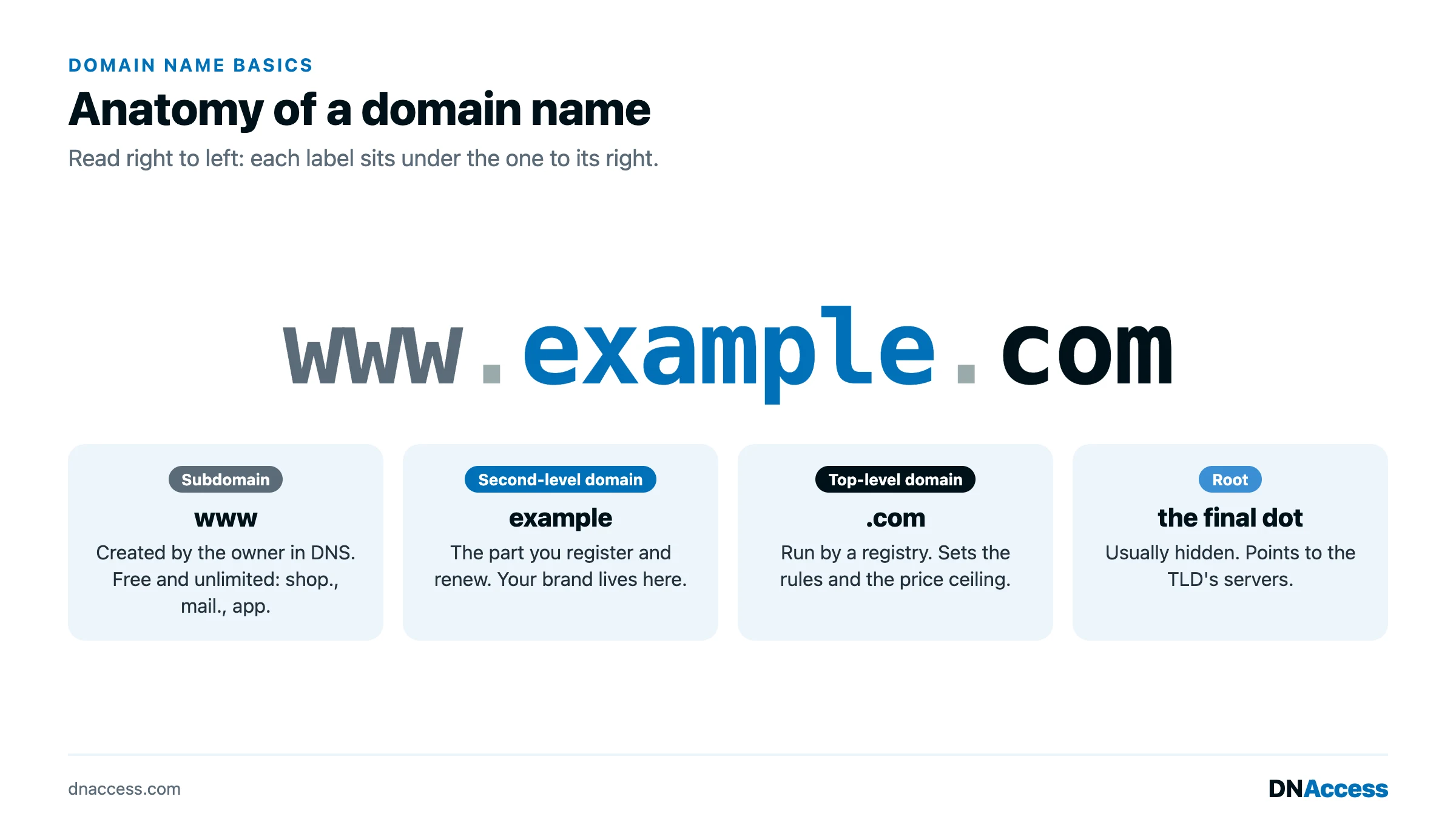
A domain name is read from right to left, from the most general part to the most specific, and each part is separated by a dot. Take the address shop.example.com.
The top-level domain, or TLD (the extension after the final dot), is .com. TLDs come in two broad families. Generic TLDs, or gTLDs, include .com, .net, .org and newer extensions such as .shop and .law. Country-code TLDs, or ccTLDs, are two-letter extensions assigned to countries and territories, such as .uk, .de and .ca. Our guide to top-level domains explains the differences in rules and pricing.
The second-level label is example, the part immediately to the left of the TLD. This is the part you choose and register. Together, the second-level label and the TLD form the registered domain name, example.com, which is the unit that is bought, renewed, transferred and, unfortunately, stolen.
A subdomain is anything added to the left of the registered name, such as shop in shop.example.com or www in www.example.com. Subdomains are not registered separately. The owner of example.com creates as many as it wants, at no cost, inside its own DNS settings. That is why a scammer can create yourbank.example-login.com without any involvement from the bank: the registered name is example-login.com, and everything to its left belongs to whoever controls it.
The dots mark each level of the hierarchy. An invisible final dot after the TLD represents the root of the system, where every lookup begins.
What you actually buy when you register a domain
Registering a domain name buys a term, not a title deed. Registrations run from one to ten years, and at the end of the term the name must be renewed or it expires, passes through a series of grace periods, and is eventually released for anyone to register. There is no option to pay once and hold a .com forever. The right is renewable indefinitely, but only if someone renews it.
That right is still valuable and legally recognized. Courts in the United States have treated a registrant’s interest in a domain name as a form of intangible property, which our guide to domain name ownership covers in detail. The practical point is simpler: the person or organization listed as the registrant holds the right, and that right lasts exactly as long as the renewals are paid. Our guide to domain renewal explains how terms, auto-renew and expiration notices work.
The parties behind every registration
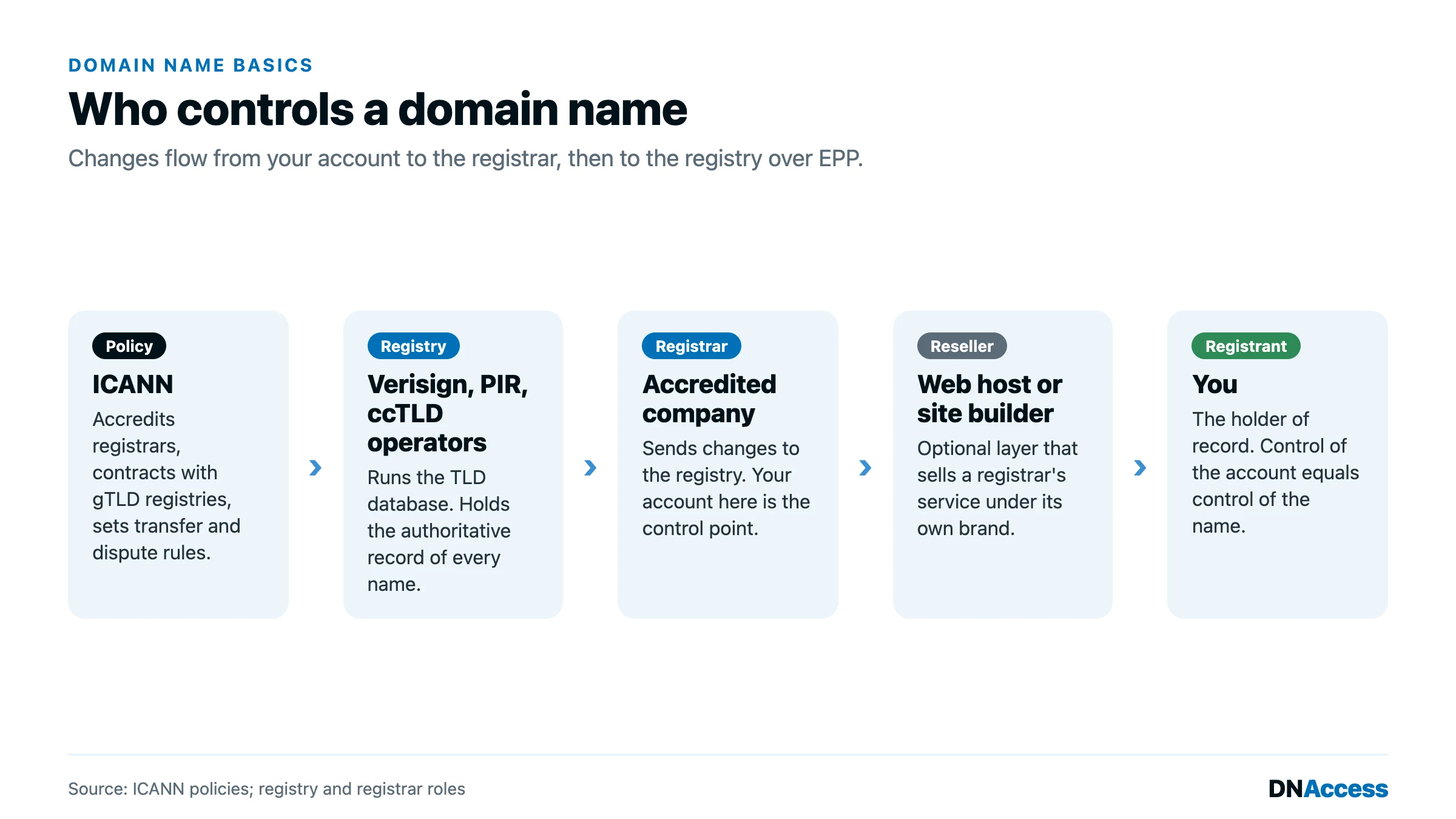
Three parties are involved in every domain name, and confusing them causes real trouble.
The registry operates the TLD. It maintains the authoritative database of every name registered under that extension. Verisign runs the registry for .com and .net; other companies and national bodies run the rest.
The registrar is the company that sells you the registration and manages it on your behalf. For gTLDs, registrars are accredited by ICANN (the Internet Corporation for Assigned Names and Numbers, the nonprofit that coordinates the domain name system). GoDaddy, Namecheap and Cloudflare Registrar are familiar examples. When you change a setting in your account, the registrar sends that change to the registry.
The registrant is you: the person or organization that holds the right to use the name. The registrant’s details are recorded in the registration data, even when they are hidden from public view.
Many people also buy domains through a reseller, such as a web host or website builder, which sits between them and the actual registrar. Our guide to registrar vs. registry explains how these roles fit together, and the existing post on how domain name registrars work covers the registrar side in more depth.
How a domain name resolves
When someone types your domain into a browser, a resolver (a server, usually run by an internet provider or a public service such as Google Public DNS or Cloudflare’s 1.1.1.1, that looks up names on the user’s behalf) asks a chain of servers where to go. It starts at the root, which points it to the servers for the TLD. The TLD servers point it to your domain’s nameservers (the servers that hold your domain’s DNS records). Your nameservers then return the answer: an A record giving the website’s IP address, or an MX record naming the server that accepts your email. The result is cached for a period set by the record’s TTL (time to live).
The nameservers you set at your registrar decide who controls those answers. Change them, and you change where your website and email go. That is why nameserver changes are one of the first things an attacker makes after taking over an account. Our guide to nameservers and DNS records walks through each record type.
Domain, website, hosting and email are four different things
Many owners treat their domain, website and email as one product because they bought them together. They are separate, and each can sit with a different company.
The domain name is the registered right to the name, held at a registrar. The website is the content and code, such as a WordPress install or a Shopify store. The hosting is the server where that website runs. Email is usually a separate service, such as Google Workspace or Microsoft 365, that the domain’s MX records point to. The domain is the piece that ties the others together, which is why losing it takes the website and the email down at the same time. Our post on how email domains work explains the mail side in detail.
Why a domain name is a business asset
There were 386.9 million domain name registrations across all top-level domains at the end of 2025, including 161.0 million .com names, according to the Verisign Domain Name Industry Brief for the fourth quarter of 2025. Behind each one is someone relying on it for a website, an email address, a login, or a brand.
For a business, the domain is the root of its online identity. Bookmarks, search rankings, inbound links, printed materials, email history and the password resets for every software account the company uses accumulate on the name over years, and none of it transfers to a new domain. A company that loses its domain loses that accumulated value and, often, its email at the same moment. The domain name is an asset in the full sense, and it deserves the same controls as a bank account.
Three mistakes that later become recovery cases
In the cases we handle, a few early decisions account for a large share of lost domains. Each is easy to avoid at registration and hard to reverse later.
Registering the name in someone else’s name
A web developer, an agency, an office manager or a founder registers the domain in a personal account, listing themselves as the registrant. Years later that person leaves, the relationship sours, or they die, and the business discovers that the legal registrant of record is not the business. The fix is to make sure the registrant organization is the company itself, using a company-controlled email address, from the first day.
Renewal tied to an old card or an old email address
Auto-renew fails quietly when the card on file expires, and expiration notices go to an inbox nobody reads, often the address of a former employee or a free account the owner forgot. The domain expires, stops resolving, and, if nobody acts during the grace periods, is released and caught by someone else within seconds of deletion. Current payment details and a monitored, role-based email address, such as [email protected], prevent most of these cases.
A weak registrar account
Control of the registrar account is control of the domain. An account protected by a reused password and no multi-factor authentication (MFA, a second proof of identity such as an authenticator app code or a security key) is the most common route to a hijacking. Once inside, an attacker changes the email address, unlocks the name, and transfers it to another registrar. Strong, unique credentials, app-based MFA or a security key, and a registrar lock are the minimum.
How DNAccess helps
A domain name is a renewable right to an address, held by whoever is listed as the registrant and controlled by whoever holds the registrar account. When those facts are in order, a domain is a quiet, reliable asset. When they are not, the problems surface all at once. DNAccess audits registrations, consolidates accounts and helps businesses put the registrant, renewal and security details right before anything goes wrong. When a domain has already been taken, our stolen domain name recovery service documents ownership, works the registrar escalation channels and, where needed, prepares the dispute. If you are unsure who controls your domain today, contact us.