Nameservers are the servers that answer the internet’s questions about your domain: where the website lives, which servers accept your email, and which services you have authorized to act on your behalf. Your domain registration does not hold any of that information itself. It holds a pointer to the nameservers, and the nameservers hold the DNS records. Understanding that split explains how websites and email reach people, why a single setting can redirect everything at once, and why attackers who take over a domain change the nameservers first. This guide is part of our domain name basics series.
What is a nameserver?
A nameserver is a server that stores the DNS records for a domain and answers queries about them. DNS (the Domain Name System) is the distributed directory that translates names such as dnaccess.com into the numeric IP addresses (Internet Protocol addresses, the numbers that identify servers) that computers use to connect. Most domains list two to four nameservers, with names like ns1.example-host.com and ns2.example-host.com, so that one can answer if another is down.
The relationship between a domain and its nameservers is called delegation. When you register a name, the registry (the operator of the top-level domain, such as .com) records which nameservers are authoritative for it. Every lookup for your domain starts by asking the registry’s servers that question. The registry does not know your website’s address. It knows only who does, and it sends the query there.
Where nameservers are set and where records are edited
Two different places control your DNS, and they are often run by two different companies. Nameservers are set at the registrar, the company where the domain is registered, because the registrar relays that setting to the registry. DNS records are edited at the DNS host, the company that operates the nameservers.
Sometimes the registrar is also the DNS host, and both settings sit in one dashboard. Often they are separate. A business might register its name at one registrar, point the nameservers to a content delivery network such as Cloudflare, and manage its email records there. In that arrangement, editing records at the registrar does nothing, because the registrar’s nameservers are no longer answering for the domain. Knowing which company holds which role is the first step in any DNS change, and it is a question we ask in nearly every case we take on.
DNS records explained
A DNS record is a single entry in the domain’s zone (the full set of records the nameservers publish for it). Each record has a type, a name, a value, and a TTL. The common types are these.
A and AAAA records
An A record maps a name to an IPv4 address, such as 203.0.113.10. An AAAA record does the same for an IPv6 address, the newer and longer address format. When someone types your domain into a browser, the A or AAAA record is what tells the browser which server to contact.
CNAME records
A CNAME (canonical name) record makes one name an alias for another. For example, www.example.com might be a CNAME pointing to example.com, or shop.example.com might point to a hosted store at a platform’s own hostname. The browser follows the alias and then looks up the address of the target.
MX records
What is an MX record? An MX (mail exchanger) record tells other mail servers where to deliver email for your domain. Each MX record names a mail server and carries a priority number; lower numbers are tried first. If your MX records point to Microsoft 365 or Google Workspace, that provider receives your mail. Change the MX records and your mail goes somewhere else, which is why they matter so much in a theft. Our guide to how email domains work covers mail routing in more depth.
TXT records
A TXT record holds text that other systems read, and it carries several of the most important security settings on a domain. SPF (Sender Policy Framework) lists the servers allowed to send mail for your domain. DKIM (DomainKeys Identified Mail) publishes a public key so receiving servers can verify that a message was signed by you. DMARC (Domain-based Message Authentication, Reporting and Conformance) tells receivers what to do with mail that fails those checks. TXT records are also used for verification: Google, Microsoft, and many software platforms ask you to publish a code to prove you control the domain.
NS, CAA, and SOA records
NS (nameserver) records list the authoritative nameservers inside the zone itself, matching the delegation at the registry. A CAA (Certification Authority Authorization) record names the certificate authorities permitted to issue SSL/TLS certificates for your domain, which limits who can obtain a certificate in your name. The SOA (start of authority) record holds administrative details about the zone, including a serial number that changes with each update.
TTL
TTL (time to live) is the number of seconds that resolvers may cache a record before asking again. A TTL of 3600 means one hour. Long TTLs reduce lookup traffic, while short ones make changes take effect quickly.
How DNS resolution works
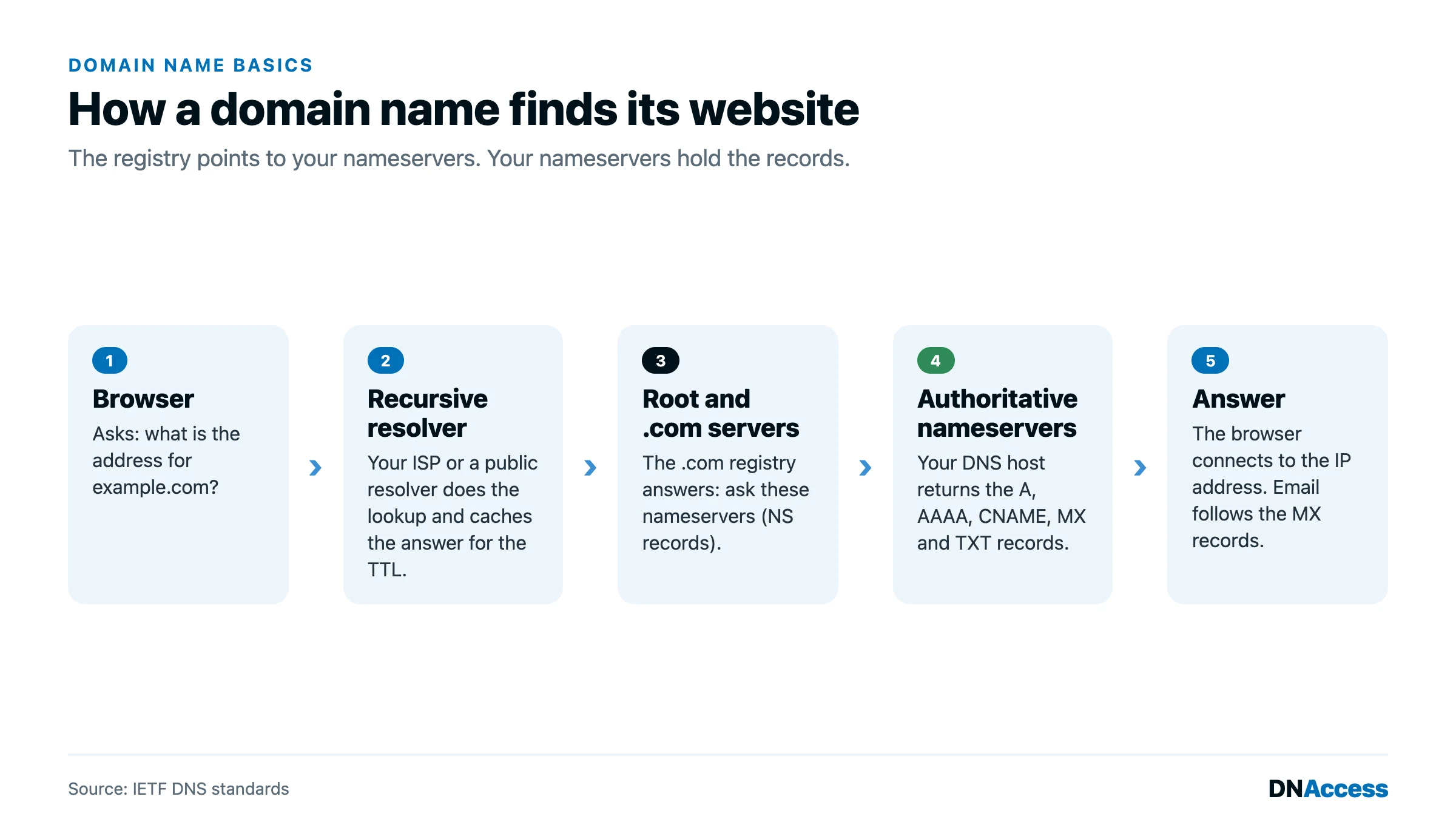
When someone visits your site, their device asks a recursive resolver, usually run by the internet provider or a public service, for the address. If the answer is not already cached, the resolver asks a root server, which refers it to the servers for the top-level domain. The top-level domain servers refer it to your nameservers. Your nameservers return the record, and the resolver caches it for the length of the TTL and passes it back to the device. The full chain usually completes in milliseconds. We walk through each step in our explainer on how DNS translates domain names.
Why changing nameservers moves everything at once
Because the registry sends every query to whatever nameservers are on file, changing the nameservers replaces the entire zone in one step. The website, the email, the verification records, and the certificate rules all now come from whoever runs the new nameservers. Nothing on the old DNS host needs to be touched.
That is exactly why hijackers change nameservers first. An attacker with access to a registrar account does not need to edit individual records or even transfer the name. Pointing the nameservers to a server the attacker controls is enough to capture the website and, through new MX records, the email, including password-reset messages for every account tied to the domain. In the registrar-credential attacks of early 2019, a stolen registrar EPP credential was used to change NS records in short windows, after which a certificate was issued and used to intercept government email, according to the Packet Clearing House briefing to the 2019 ICANN DNS Symposium. Researchers studying the related Sea Turtle campaigns found that for 51% of hijacked domains the attacker’s resolution lasted at most one day, as reported in Akiwate and colleagues’ 2022 study of targeted DNS infrastructure hijacking. A day is enough. Our guide to DNS hijacking explains these attacks in detail.
Stale nameservers create a quieter risk. ICANN’s Security and Stability Advisory Committee found that registrar nameserver renaming practices exposed over 500,000 gTLD domains to resolution hijacking risk as of September 2020, in SAC125, its report on registrar nameserver management. A domain that still lists a nameserver whose own domain has lapsed can be taken over by whoever registers that lapsed name. Signing the zone with DNSSEC (DNS Security Extensions, which let resolvers verify that answers are authentic) adds protection against forged answers, and a registry lock (a registry-level hold that blocks changes until the registrar verifies the request out of band) stops unauthorized nameserver changes at the registry itself.
DNS history as evidence
Passive DNS services record what a domain’s nameservers and records returned over time. That record often shows the exact hour a hijacker switched nameservers, which IP addresses served the site, and when mail was redirected. In disputes and recovery cases, DNS history can establish who controlled a domain and when, as we explain in our guide to domain name DNS history.
How to change nameservers and DNS records safely
The mistakes that turn routine changes into outages, or into recovery cases, are consistent. Owners switch nameservers without copying the existing records, and email stops. They leave old nameservers listed that point to a provider they canceled. They share registrar logins with a vendor, who then controls the nameservers indefinitely.
A safe change follows a simple order. First, export the full zone from the current DNS host, or at least record every A, CNAME, MX, and TXT entry. Then rebuild those records at the new host before changing anything at the registrar. A day or two before the switch, lower the TTL on key records to a few minutes so that any correction spreads quickly. Once the new host is ready, change the nameservers at the registrar, confirm that the website and mail work, and then raise the TTLs again. Finally, remove nameservers you no longer use and confirm the registrar account is protected by multi-factor authentication.
How DNAccess helps with nameservers and DNS
Nameservers decide where your domain’s traffic and email go, so control of them is control of the domain in practice. DNAccess watches for the changes that matter. DNShield, our domain name monitoring service, alerts you when nameservers, MX records, or registration details change, so an unauthorized edit is caught in hours rather than weeks. Our domain name management service audits nameservers and records across a portfolio, removes stale delegations, and handles DNS moves without downtime. If your nameservers changed and you did not change them, contact us immediately.