A domain transfer is any change in who holds a domain name or which company manages it, and the phrase covers three different procedures that work in different ways. Moving a name from one registrar (the ICANN-accredited company that sells and manages registrations) to another is one kind of transfer. Moving a name between two accounts at the same registrar is a second. Changing the legal owner of the name is a third. Each has its own steps, its own safeguards, and its own failure points. This guide explains all three in plain terms, because a domain transfer is also the single moment when a domain name is most likely to be stolen. It is part of our domain name basics series.
Three things people call a domain transfer
Before you start any domain transfer, it helps to know which of the three you actually need. Choosing the wrong procedure wastes days and, in the worst cases, leaves a name half-moved and exposed.
Inter-registrar transfer
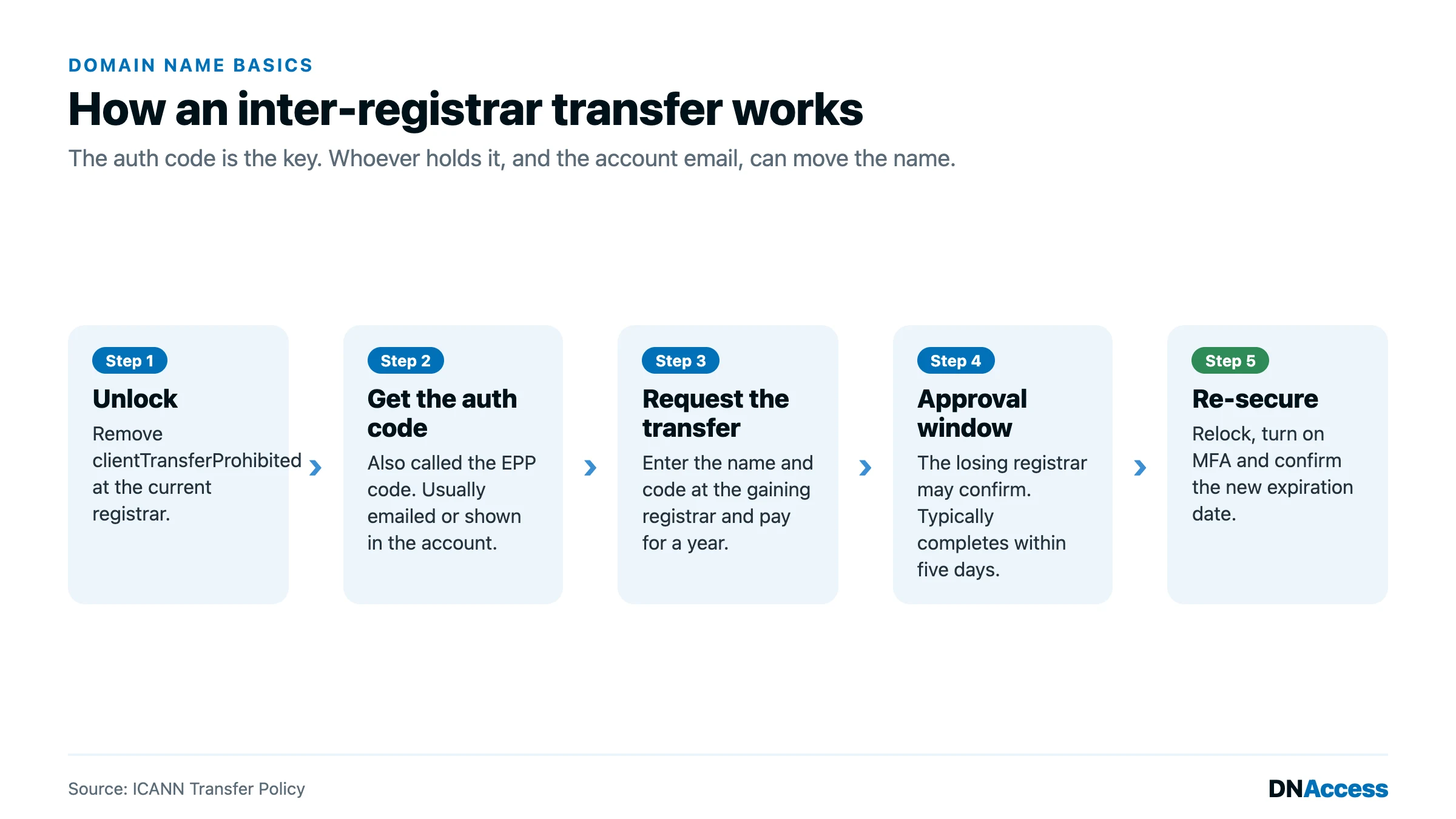
An inter-registrar transfer moves the registration from one registrar, called the losing registrar, to another, called the gaining registrar. The owner of the name does not change. What changes is the company that relays instructions to the registry (the operator that keeps the master database for a top-level domain such as .com). The process is governed by ICANN’s Transfer Policy and runs on a few fixed parts: the name must be unlocked, the owner must supply an authorization code, the gaining registrar must submit the request, and the losing registrar has up to five days to act on it before the registry completes the move. For most generic domains, an inter-registrar transfer also adds one year to the registration term, because the gaining registrar charges for a renewal as part of the transfer.
Account-to-account push
A domain push moves a name from one customer account to another at the same registrar. Nothing is sent to the registry, so there is no authorization code, no five-day window, and usually no added year. Registrars call this a push, an account change, or an internal transfer. A push is common when a business takes a name back from a web developer or marketing agency that registered it in the agency’s own account. It is fast, often immediate, and that speed is exactly why a push initiated from a compromised account is so damaging.
Change of registrant
A change of registrant is a transfer of ownership. The registrant (the person or organization legally recorded as holding the domain) is replaced with a new one, which is what happens when you transfer a domain to a new owner after a sale. Under ICANN’s Transfer Policy, a material change to the registrant’s name, organization, or email address may trigger a 60-day transfer lock, during which the name cannot be moved to another registrar. Some registrars let the registrant opt out of that lock before the change is made. The lock exists because thieves who take over an account often change the owner details first and then try to move the name away; the 60 days give the rightful owner time to notice.
How to transfer a domain name to a new registrar
Moving your own domain to a different registrar is the procedure most people mean when they ask how to transfer a domain name.
First, confirm the name is eligible. A domain generally cannot move to another registrar within 60 days of its initial registration or of a previous inter-registrar transfer, and a name that is expired or about to expire should be renewed first. Check the status codes on the registration, which you can read in a public lookup; a status of clientTransferProhibited means the registrar lock is on, and serverTransferProhibited means the registry has locked it. Our guide to domain status codes explains what each one blocks.
Then confirm that the contact email on the registration is current and that you can receive mail there. Approvals, notices, and the authorization code itself often go to that address. If it belongs to a former employee or a developer you no longer work with, fix it before you begin.
Next, turn off the domain transfer lock in your current registrar account. This lock, shown as clientTransferProhibited, tells the registry to refuse any transfer request. While you are there, request the authorization code, also called the EPP code (after the Extensible Provisioning Protocol that registrars use to talk to registries) or the domain authorization code. ICANN’s newer policy language calls it a Transfer Authorization Code. It is a password unique to that domain, and it proves to the gaining registrar that the request comes from the person who controls the name.
Once you have the code, start the transfer at the gaining registrar, enter the code, and pay for the transfer. The gaining registrar submits the request to the registry. The losing registrar may send a notice asking you to confirm or reject the transfer; approving it speeds things up. If nobody acts, the registry generally completes the transfer automatically when the five-day window closes.
Finally, check the new registration. Confirm the expiration date has moved out one year, that the nameservers (the servers that tell the internet where your website and email live) did not change unless you intended them to, and that the transfer lock is back on at the new registrar. The name will be locked against another registrar transfer for 60 days.
Selling a domain: transferring to a buyer
When you sell a domain or buy one from another party, the domain transfer is only half of the transaction. The other half is the money, and the two need to happen in a controlled sequence. The standard approach is escrow: a neutral escrow service holds the buyer’s payment, the seller delivers the domain by push or by authorization code, the buyer confirms receipt, and only then is the payment released. Escrow protects both sides from the most common aftermarket fraud, in which one party delivers and the other disappears.
The seller should also update the registrant record so that ownership, and not just account access, moves to the buyer. A buyer who receives a name by push into an account but never becomes the recorded registrant may have trouble proving ownership later. Our guide to buying a domain that is already taken covers negotiation and escrow, and our explainer on domain name ownership explains why the registrant record matters more than whose account the name sits in.
Why transfers are when domain thefts happen
Every protection on a domain name exists to stop an unauthorized transfer, which tells you where the risk sits. A thief does not need to break the registry. A thief needs the authorization code, or access to the account where the name can be unlocked and pushed. In the recoveries we handle, the domain transfer is almost always the moment the name actually leaves its owner.
Two weaknesses account for most of those cases. The first is email. Authorization codes, transfer approvals, and password resets are routinely sent to the registrant email address. If that mailbox is compromised, or if it sits on a domain that has expired and been re-registered by someone else, the attacker receives everything needed to move the name. The second is account compromise. A registrar account protected only by a reused password, with no multi-factor authentication (a second login step such as a code from an authenticator app), can be taken over and the domain pushed to another account or unlocked and transferred out in minutes. Our guide to registrar account security sets out the controls that close both gaps, and a registry lock (a registry-level hold that blocks changes until the registrar verifies the request out of band) adds a layer that a stolen password alone cannot defeat.
The mistakes that later turn into recovery cases are consistent. Owners leave the registrant email pointed at an address they no longer monitor. They let a developer or agency hold the name in the agency’s account. They ignore a transfer notice because it looks like routine registrar mail. The full pattern is described in our domain hijacking hub.
What to do if a transfer you did not request appears
If you receive a notice that your domain is being transferred and you did not start it, act at once. Reply to the notice and deny the transfer, using the reject link or instructions in the losing registrar’s message. Then call your registrar’s support line, tell them the request is unauthorized, and ask them to re-lock the name and reset the account credentials. Change the password on the email account tied to the registration as well, since that is often how the attacker got in.
If the transfer has already completed, time matters even more. ICANN’s Transfer Policy provides a Transfer Emergency Action Contact (TEAC), a channel that registrars use to reach each other in urgent transfer cases, and it requires that a human at the gaining registrar respond to a TEAC request “within 4 hours, although final resolution of the incident may take longer,” according to the ICANN Transfer Policy Review working group’s 2023 TEAC and TDRP briefing. Only a registrar can use the TEAC, so your job is to get your losing registrar to invoke it quickly. Registrars may also use a Transfer Undo Request Form, explained in our guide to the TURF process for hijacked domain names.
Formal disputes between registrars run through the Transfer Dispute Resolution Policy (TDRP), and ICANN’s text states that “a dispute must be filed no later than twelve (12) months after the alleged violation,” with only the gaining or losing registrar permitted to file, as set out in the ICANN Transfer Dispute Resolution Policy. A registrant cannot file one directly. That is why a stolen domain usually needs someone who knows how to move registrars to act, and why waiting weeks to report a theft narrows the options.
How DNAccess helps with domain transfers
A domain transfer is routine when the name is yours, the email is current, and the account is secured. It becomes an emergency when any of those is missing. DNAccess handles both sides. Our domain name management service consolidates names into accounts our clients control, corrects registrant records, and manages transfers between registrars without gaps in protection. When a transfer has already gone wrong, our stolen domain name recovery service works with the losing and gaining registrars, the registry, and, where needed, counsel to return the name. If a transfer notice you did not expect is sitting in your inbox now, contact us before you do anything else with it.