A domain name is the one asset almost every other online asset depends on. The website resolves because the domain points to it. Corporate email is delivered because the domain’s MX (mail exchange) records say where to deliver it. Single sign-on, password resets, SaaS invitations, API callbacks, and the TLS certificates that make the padlock appear in a browser all hang from the same name. Domain name security is the discipline of protecting that root of trust, and it is routinely the least examined control in an organization that has otherwise spent heavily on firewalls, endpoint protection and identity management.
This guide is the hub for the DNAccess domain security library. It sets out the threat model, the layers of control that answer each threat, what the published adoption data says about how few organizations have those layers in place, and a review structure a company can run once a year. The detailed guides linked throughout cover each control in depth.
Why the domain is the root of trust
Consider what an attacker gains by controlling a domain rather than a server. With the server, they get one application. With the domain, they can point the website anywhere, reroute inbound email to a mailbox they control, request a new TLS certificate from any certificate authority that validates ownership through DNS, and then reset passwords on every SaaS account that was created with an address at that domain. The attacker does not need to break any of those systems. They simply inherit the trust that the systems extend to the domain.
That is why we describe the domain as the root of trust. The registrar account that controls it, the email address that controls the registrar account, and the DNS provider that publishes its records together form a chain. Compromise any link and the rest of the chain follows. Domain name security, properly understood, is the practice of hardening every link in that chain and watching it continuously.
In the recoveries we handle at DNAccess, the loss of a single domain has meant a dark website, email that silently arrived in a stranger’s inbox, and weeks of work to restore control. Almost every one of those cases traces back to a control that was available and simply not turned on.
The threat model: how domains are lost
A useful security program starts with an honest list of the ways the asset can be taken. For domain names the list is short, which makes it manageable, but each entry has a different mechanism and therefore a different defense.
Registrar account takeover and domain hijacking
The most common path to a stolen domain is the registrar account. An attacker obtains the password through phishing, credential stuffing from another breach, or a password-reset request sent to a registrant email address they have already compromised. Once inside, they can push the domain to another registrar, change the nameservers, or both. Our domain hijacking hub covers the attack pattern and the recovery options in detail, and the registrar account security guide explains the account-level defenses. ICANN’s Security and Stability Advisory Committee has published registrant guidance on this problem since 2010; its report SAC044 sets out 12 credential-protection practices and recommends the clientTransferProhibited, clientUpdateProhibited and clientDeleteProhibited status codes with registry lock as an additional layer, according to the SSAC’s Registrant’s Guide to Protecting Domain Name Registration Accounts.
DNS hijacking campaigns
DNS hijacking changes where a domain resolves without necessarily transferring the registration. The attacker edits nameserver or A records at the registrar or DNS provider, obtains a certificate for the domain, and intercepts traffic or email for as long as the change persists. The best documented example is the series of campaigns known as Sea Turtle, which targeted government ministries and telecommunications providers. Researchers who retroactively analyzed those campaigns identified 41 hijacked domains between January 2017 and March 2021, 33 of them tied to Sea Turtle, found that attackers obtained certificates for 40 of the hijacked domains, and observed that for 51 percent of hijacked domains the attacker’s resolution lasted at most one day, according to the ACM IMC 2022 study on targeted DNS infrastructure hijacking. A one-day window is long enough to harvest credentials and short enough to escape notice without monitoring.
The United States government treated the threat seriously enough to issue an emergency order. On January 22, 2019, the Department of Homeland Security issued Emergency Directive 19-01, which required federal agencies within ten business days to audit all public DNS records, change passwords on every account that could modify DNS, add multi-factor authentication to those accounts, and begin monitoring Certificate Transparency logs, according to the CISA Emergency Directive 19-01. Those four actions remain a sound checklist for any organization, and our DNS hijacking guide walks through them.
Phishing and lookalike domains
Not every attack involves your domain at all. A lookalike domain, meaning a registration that imitates yours through a misspelling, a swapped character, or a different top-level domain, lets an attacker impersonate your brand to customers, vendors and employees. CSC reported that 80 percent of homoglyph (lookalike) domains resembling Forbes Global 2000 brands are owned by third parties, and that 42 percent of those third-party domains carried MX records in 2024, meaning they were configured to send or receive email, according to the CSC 2024 Domain Security Report. The typosquatting guide and the lookalike domains guide cover detection, blocking and enforcement.
Expiration lapses
Some of the most damaging losses involve no attacker at all. A renewal card expires, the only person who received renewal notices has left the company, and the domain drops. Once a name is deleted, drop-catching services compete to register it within seconds, and the new owner inherits every link, email and login tied to it. Renewal governance is therefore a security control, not an administrative chore, and our domain monitoring hub explains how expiration monitoring fits alongside the other watches.
Insider risk
Finally, the people with legitimate access can become the threat. A former web developer who registered the domain in a personal account, an agency that controls the DNS, or an ex-employee with a grudge can each hold a domain hostage. The Ninth Circuit affirmed a jury verdict against a former employee who registered his employer’s domain and withheld it to extract disputed commissions in DSPT International v. Nahum (9th Cir. 2010), holding that holding a domain for ransom is cybersquatting under the Anticybersquatting Consumer Protection Act. Litigation works, but it is slow and expensive, and the better answer is ownership and access rules that never let an individual hold the keys alone.
The control layers
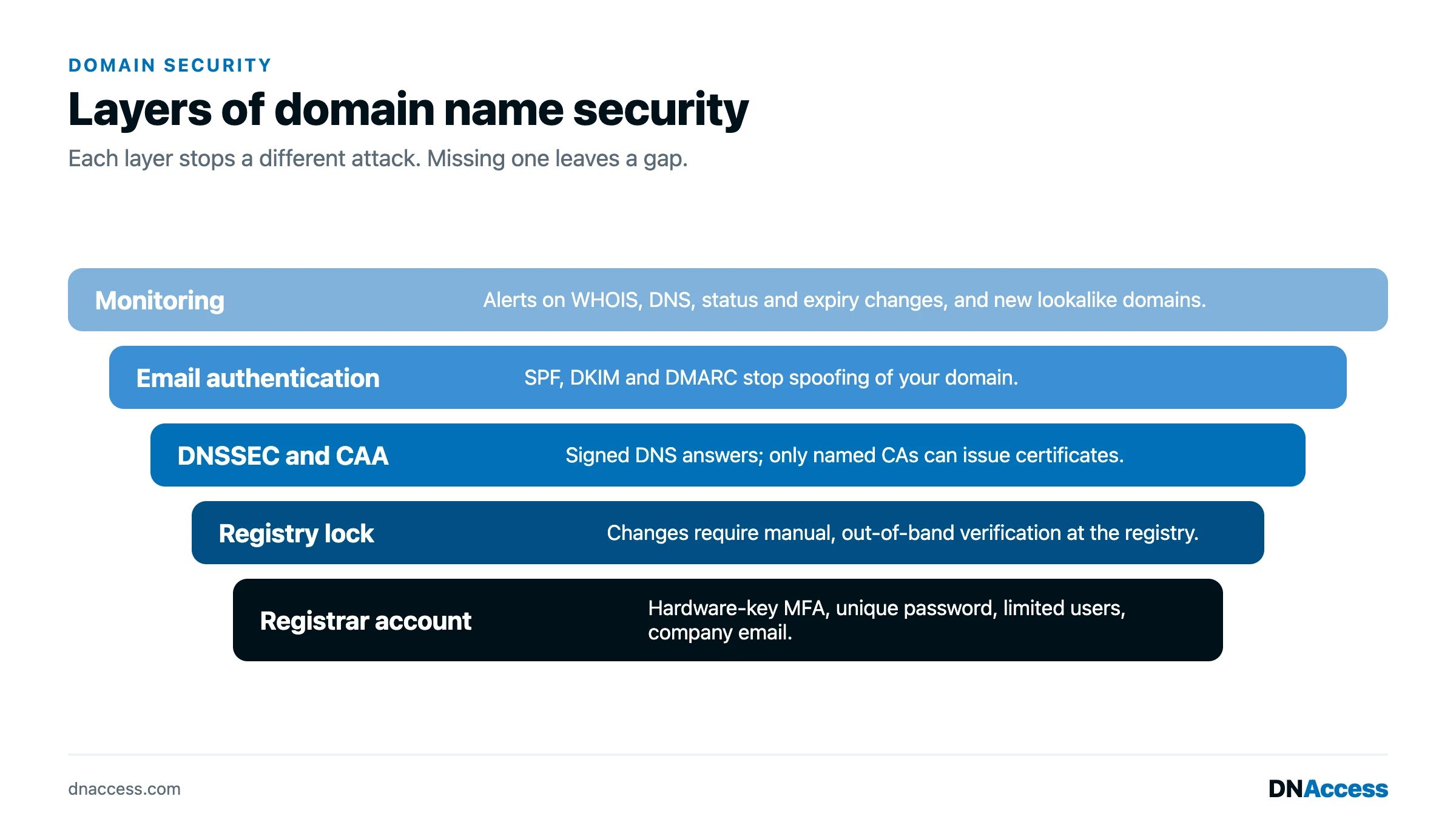
Each threat above maps to one or more controls. We organize them as layers, from the email address at the bottom to policy and people at the top, because a weakness in a lower layer undermines everything above it.
The registrant email address
The email address on the registrar account is the master key. Whoever controls it can reset the registrar password and, at most registrars, approve a transfer. That address should be a dedicated mailbox on a domain you control, protected by multi-factor authentication, monitored by more than one person, and never tied to a single employee’s personal account. If the mailbox lives on the same domain it protects, make sure the DNS for that domain cannot be changed without the controls described below, or an attacker who hijacks DNS can intercept the password reset.
The registrar account
The registrar account needs a unique, long password stored in a password manager, multi-factor authentication with a hardware security key or authenticator app rather than SMS, and a short list of named users with the minimum permissions each needs. The registrar account security guide covers the full configuration, including how to handle registrar support-desk social engineering, where an attacker impersonates you to the registrar’s own staff.
Transfer locks and registry lock
Transfer lock, sometimes called registrar lock, is the set of status codes a registrar places on a domain so the registry refuses transfer, update or delete requests. It is effective against outside transfer attempts and should be on every domain. Its limitation is that anyone with access to the registrar account can remove it, which means it does nothing against account takeover.
Registry lock (a registry-level hold that blocks changes until the registrar verifies the request out of band, usually by a phone call or a signed authorization between named contacts) closes that gap. Because the lock is held at the registry rather than the registrar, no change to nameservers, contacts or registrar can proceed until a human completes the verification. It is the single most effective control against hijacking available today, and it remains uncommon. CSC found that 24 percent of Forbes Global 2000 companies use registry lock, up from 17 percent in 2020, rising to 45 percent among companies using enterprise-class registrars, according to the CSC 2024 Domain Security Report. The registry lock guide explains how it works, who offers it, and what it costs.
DNSSEC
DNSSEC (Domain Name System Security Extensions, which cryptographically sign DNS data so a resolver can verify that an answer came from the legitimate zone) addresses a different problem: forged DNS responses that redirect users without touching the registrar or the DNS provider. Adoption is low at the second level. The European Commission’s Joint Research Centre reported that about 92.2 percent of top-level domains in the root zone were DNSSEC-signed as of October 2021, but that only about 5 percent of second-level domains were signed, and that the global validation rate by resolvers was around 27 percent, according to the JRC analysis of DNSSEC uptake in the EU. Among the Global 2000, CSC put DNSSEC adoption at 9 percent, up from 3 percent in 2020, in the same 2024 Domain Security Report.
DNSSEC also carries an operational burden. A 2025 study of 319,277 signed domains observed between March 2020 and September 2024 found that 25.6 percent had at least one DNSSEC error, and that NSEC3 misconfigurations, delegation failures and missing or expired signatures accounted for more than 70 percent of all bogus states, according to Decoding DNSSEC Errors at Scale. Signing without monitoring can take a domain offline. The DNSSEC guide explains when it is worth the effort and how to deploy it safely.
DNS provider hardening
Many organizations host DNS at a provider separate from the registrar, which means a second account with the power to redirect the domain. That account needs the same treatment as the registrar account: dedicated email, multi-factor authentication, named users, and change logging. Where the provider supports it, restrict who can edit records and require approval for changes to NS, MX and the records that certificate authorities check.
Monitoring
Controls fail quietly. Monitoring is how you learn that a nameserver changed, a registrar transfer was initiated, a lookalike domain was registered, or a certificate was issued for your domain by an authority you do not use. Certificate Transparency monitoring in particular catches the step that nearly every DNS hijacking campaign includes, which is why ED 19-01 required it. Our domain monitoring hub describes the watches worth running, and DNShield, our monitoring service, runs them for clients.
Renewal governance
Renewal governance means that expiration cannot depend on one person, one card or one inbox. Register core domains for the longest term the registry allows, enable auto-renew on a corporate card with a long expiry, route renewal notices to a shared mailbox, and review the expiration calendar quarterly. Make the registrant of record the company, not an employee, so the organization retains legal standing if the employee leaves.
Policy and people
The top layer is written policy: who may request a DNS change, who approves it, how departures are handled, which domains are classified as critical and therefore registry-locked, and what the recovery runbook says to do at two in the morning when email stops arriving. The technical controls hold only as long as the people operating them follow the policy. The domain name security best practices post lists the operating habits we recommend.
What the adoption data says
The pattern across every published measurement is the same: the controls exist, they are inexpensive relative to the asset, and most organizations have not turned them on. CSC’s finding that 68 percent of Global 2000 companies had adopted less than half of the recommended domain security measures, and that 107 companies scored zero, is the clearest statement of the gap, according to the CSC 2024 Domain Security Report. The same report found DMARC adoption at 71 percent, up from 39 percent, which shows that when a control becomes a compliance expectation, adoption follows. Registry lock, DNSSEC and CAA records (which tell certificate authorities which of them may issue for a domain; CSC put CAA adoption at 10 percent) have not yet reached that point.
If the largest companies in the world are at 24 percent on registry lock and 9 percent on DNSSEC, smaller organizations are almost certainly lower. The attackers know which controls are usually missing.
An annual domain security review
A review needs to be complete and repeated rather than elaborate. We structure it in five passes that a company can run in a day or two each year, and more often for critical domains.
The first pass is inventory. List every domain the organization owns, including those registered by subsidiaries, agencies and individual employees, with the registrar, registrant email, nameservers, expiration date and business purpose for each. Classify each domain as critical, active or defensive. Most organizations discover domains they did not know about during this pass.
The second pass is access. For each registrar and DNS provider account, list the named users, confirm that multi-factor authentication is enforced for all of them, confirm the registrant email is a dedicated monitored mailbox, and remove anyone who has left or whose role no longer requires access. Check that the registrant organization on the WHOIS or RDAP record (the public registration record for a domain name) is the company, not a person.
The third pass is locks. Confirm that every domain carries the clientTransferProhibited, clientUpdateProhibited and clientDeleteProhibited status codes, and that every critical domain carries registry lock with the server-level status codes. Review the registry lock contact list, since the people named on it are the only ones who can authorize changes.
The fourth pass is DNS. Export the zone for each active domain and review it line by line for records that no longer belong, including stale subdomains pointing at decommissioned cloud resources, which can be taken over. Confirm DNSSEC status where it is deployed and verify that the DS record at the registry matches the keys at the DNS provider. Confirm that SPF, DKIM and DMARC records are present and that DMARC is at an enforcing policy.
The fifth pass is renewal and monitoring. Confirm auto-renew, the payment method, the renewal notice recipients and the registration term for each domain. Confirm that monitoring alerts for registration changes, DNS changes, certificate issuance and lookalike registrations reach people who will act on them. Finally, read the recovery runbook aloud with the people who would execute it and update anything that has changed.
The how to secure a domain name guide turns these passes into a working afternoon for a small portfolio.
Where to start if you have done none of this
Start with the registrant email and the registrar account, because they are the keys to everything else and take an hour to fix. Then turn on transfer lock everywhere and registry lock on the domains the business cannot operate without. Add monitoring next, because it tells you whether the other controls are working. Domain name security is cumulative: each layer you add removes an entire category of attack, and the first three layers remove most of them.
Guides in the domain security hub
The pages below go deeper on the subjects covered here, and we add to this list as new guides are published.
- How to secure a domain name is the working checklist for an afternoon of hardening.
- Registry lock explained covers how it differs from registrar lock, who offers it, and when it is worth the friction.
- Typosquatting covers lookalike variants, the research on their scale, and how to protect against them.
- DNSSEC for domain owners explains what it protects and when to turn it on.
- DNS hijacking attacks covers Sea Turtle, DNSpionage, and the 2019 emergency directive.
- Lookalike domains covers detection and takedown.
- Registrar account security checklist covers MFA, roles, locks, and offboarding.
What DNAccess does on domain security
DNAccess works on both sides of this problem. When a domain has already been stolen or hijacked, we recover it, and we have recovered hundreds of stolen domain names through registrar escalation, ICANN’s transfer dispute procedures, the UDRP where it applies, and litigation where it does not. The Patterns.com recovery, which we completed through the UDRP after the domain was stolen from a Network Solutions account, is one example, and its later loss through an unauthorized sale, described in our Patterns.com case study, shows why a recovered domain still needs protecting.
Before that point, our domain name management service takes over the operational side: consolidating a portfolio at an appropriate registrar, configuring account security, arranging registry lock on critical domains, managing renewals, and running the annual review described above. Our DNShield domain name monitoring service watches registration data, nameservers, certificates and lookalike registrations and alerts the people you designate. If you would like us to review your portfolio or help you put these controls in place, contact DNAccess.